





04-01-2024, 02:07 AM
1. use Gitpod, you just need a web browser: https://tasmota.github.io/docs/Gitpod/
2. for example: we make a new tasmota firmware for ESP32 MATTER + enable PCF8574 i2c bus chip.

3. When compiling your build add the following to user_config_override.h
#define USE_I2C // Add support for I2C
#define USE_PCF8574 // [I2cDriver2] Enable PCF8574 I/O Expander (I2C addresses 0x20 - 0x26 and 0x39 - 0x3F) (+2k1 code)
#define USE_PCF8574_SENSOR // Enable Mode1 inputs and outputs in SENSOR message (+0k2 code)
#define USE_PCF8574_DISPLAYINPUT // Enable Mode1 inputs display in Web page (+0k2 code)
#define USE_PCF8574_MQTTINPUT // Enable Mode1 MQTT message & rule process on input change detection : stat/%topic%/PCF8574_INP = {"Time":"2021-03-07T16:19:23+01:00","PCF8574-1_INP":{"D1":1}} (+0k5 code)
4. after SAVE the FILE, then run command: "platformio run -e tasmota32"
Command "platformio run -e tasmota32" is correct for ESP32 builds, "platformio run -e tasmota" is only for esp8266 builds.
5. after compiled, download "tasmota32.factory.bin".

6. then use ESP DOWNLOAD TOOL write to ESP32 in address 0x0

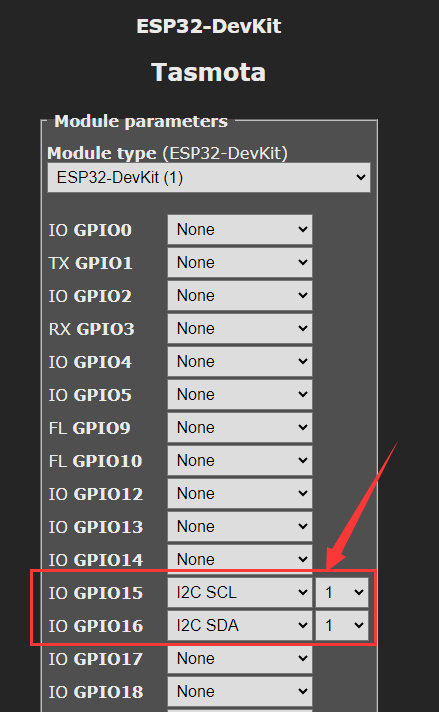
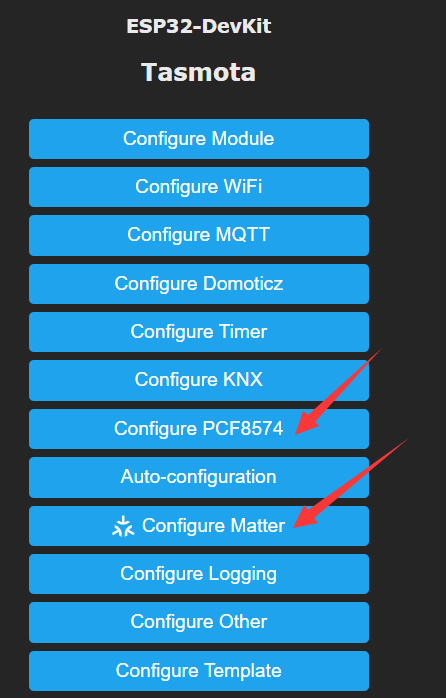
7. after re power on of ESP32 board, you can connect with tasmota, config it with I2C SDA and SCL pins firstly, then you can see the PCF8574 option and MATTER option.
Tasmota ESP32 MATTER+PCF8574 firmware download (after downloaded the ZIP file, you need to unzip get the BIN file)
 tasmota32.factory.zip (Size: 1.69 MB / Downloads: 813)
2. for example: we make a new tasmota firmware for ESP32 MATTER + enable PCF8574 i2c bus chip.
3. When compiling your build add the following to user_config_override.h
#define USE_I2C // Add support for I2C
#define USE_PCF8574 // [I2cDriver2] Enable PCF8574 I/O Expander (I2C addresses 0x20 - 0x26 and 0x39 - 0x3F) (+2k1 code)
#define USE_PCF8574_SENSOR // Enable Mode1 inputs and outputs in SENSOR message (+0k2 code)
#define USE_PCF8574_DISPLAYINPUT // Enable Mode1 inputs display in Web page (+0k2 code)
#define USE_PCF8574_MQTTINPUT // Enable Mode1 MQTT message & rule process on input change detection : stat/%topic%/PCF8574_INP = {"Time":"2021-03-07T16:19:23+01:00","PCF8574-1_INP":{"D1":1}} (+0k5 code)
4. after SAVE the FILE, then run command: "platformio run -e tasmota32"
Command "platformio run -e tasmota32" is correct for ESP32 builds, "platformio run -e tasmota" is only for esp8266 builds.
5. after compiled, download "tasmota32.factory.bin".
6. then use ESP DOWNLOAD TOOL write to ESP32 in address 0x0
7. after re power on of ESP32 board, you can connect with tasmota, config it with I2C SDA and SCL pins firstly, then you can see the PCF8574 option and MATTER option.
Tasmota ESP32 MATTER+PCF8574 firmware download (after downloaded the ZIP file, you need to unzip get the BIN file)
tasmota32.factory.zip (Size: 1.69 MB / Downloads: 813)
YouTube: https://www.youtube.com/c/KinCony
Online Store: https://shop.kincony.com
Alibaba Store: https://kincony.en.alibaba.com/
Online Store: https://shop.kincony.com
Alibaba Store: https://kincony.en.alibaba.com/
