





UDP Server / TCP Server / Loxone / RS232:
Learn IR (MAX support 192 IR signals):
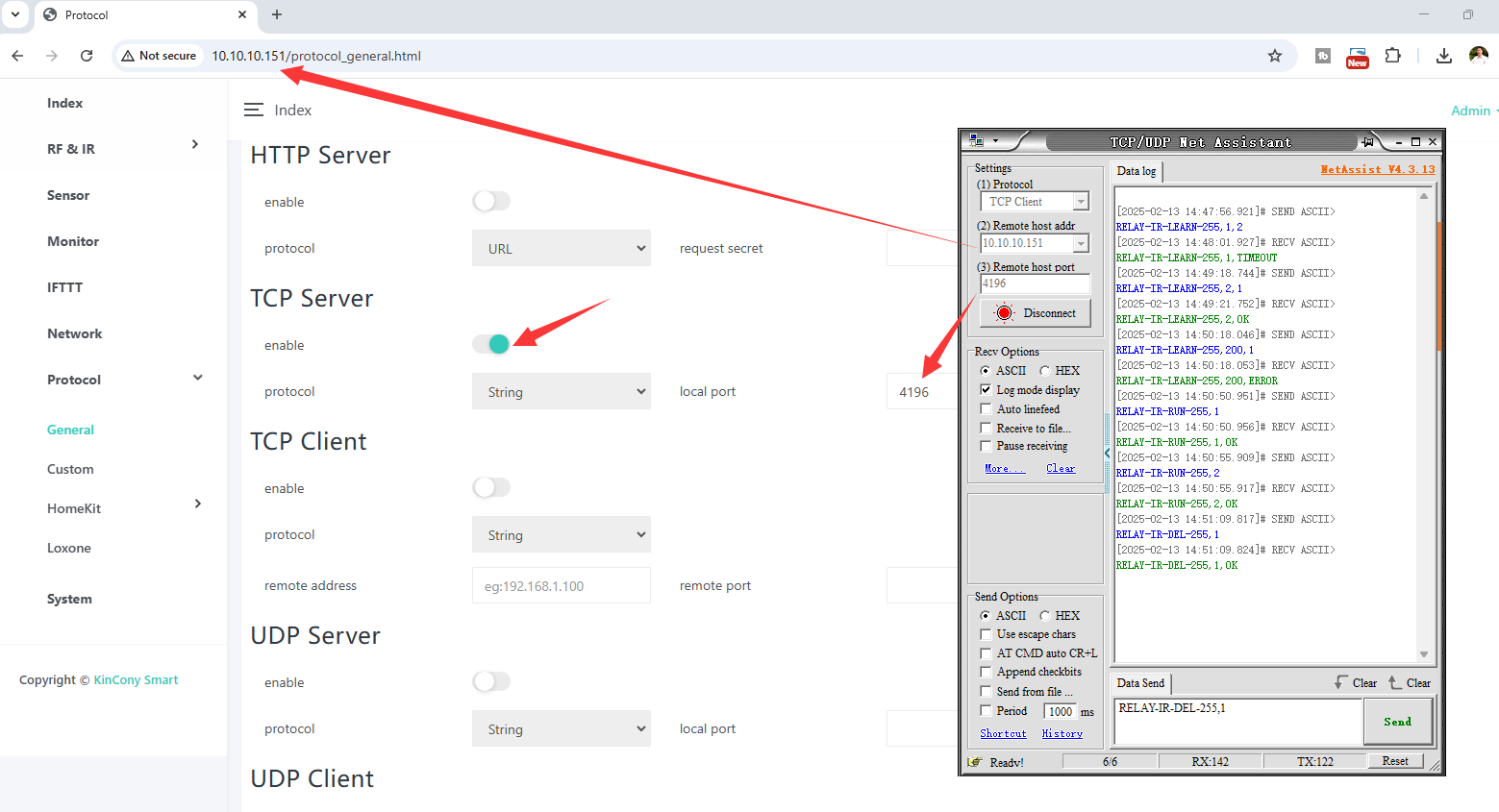
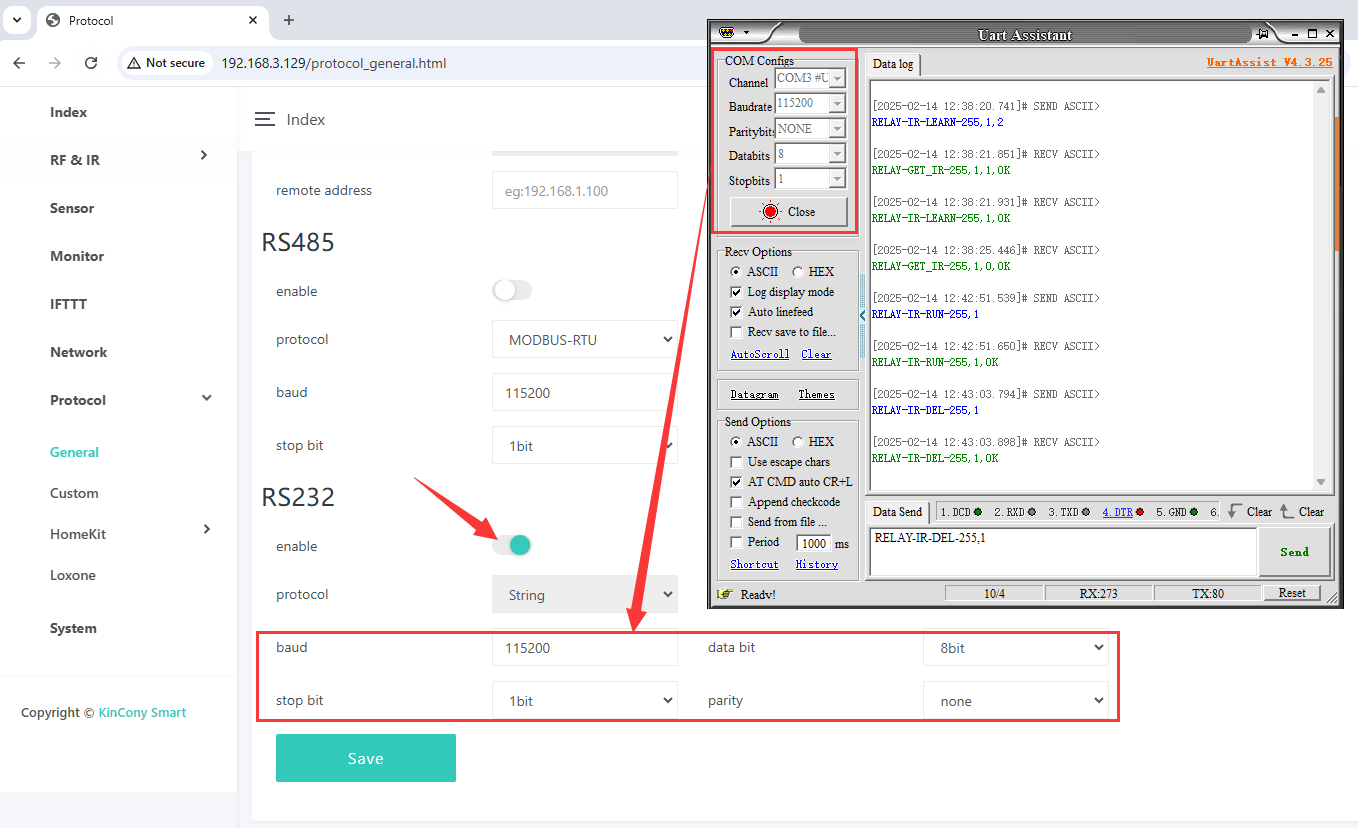
send: RELAY-IR-LEARN-255,1,2 // begin learn IR signal ID=1, send by IR tube-2
receive: RELAY-IR-LEARN-255,1,OK // success
receive: RELAY-IR-LEARN-255,1,TIMEOUT // timeout
send: RELAY-IR-LEARN-255,200 // if send IR exceeding the maximum IR ID(MAX=192)
receive: RELAY-IR-LEARN-255,200,ERROR // error
Send IR:
send: RELAY-IR-RUN-255,1 // send IR signal ID=1
receive: RELAY-IR-RUN-255,1,OK
Delete IR:
send: RELAY-IR-DEL-255,1 // delete learned IR signal ID=1
receive: RELAY-IR-DEL-255,1,OK
---------------------------------------------------------------
UDP Client / TCP Client / Loxone / RS232:
IR triggered and auto feedback: (ONLY use for NEC and RC5 IR code)
RELAY-GET_IR-255,1,1,OK // trigger
RELAY-GET_IR-255,1,0,OK // not trigger
---------------------------------------------------------------
MQTT:
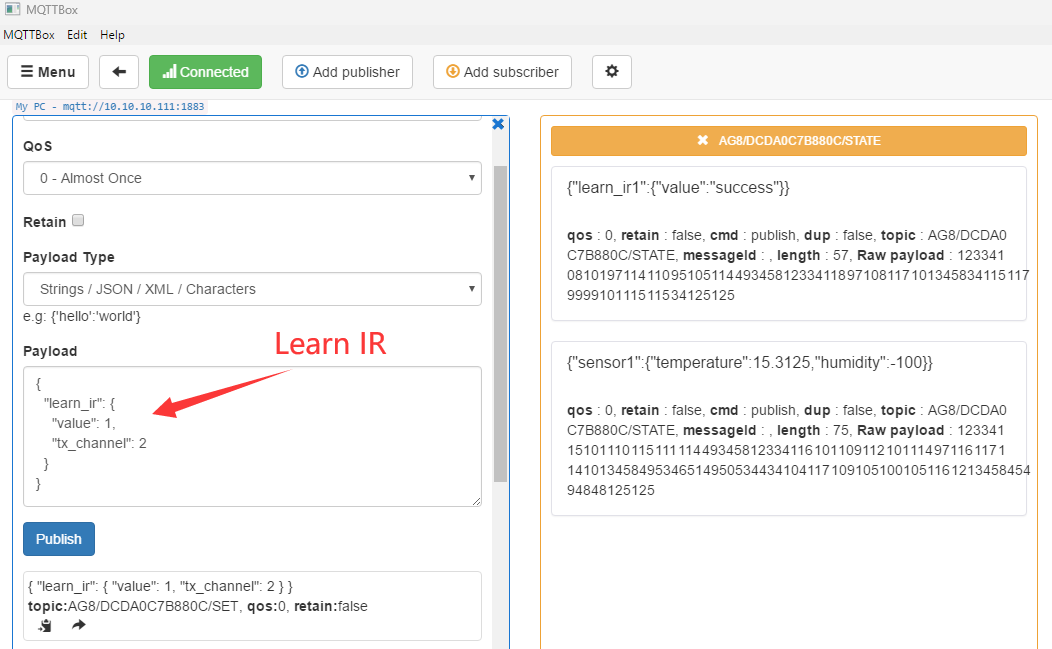
Learn IR: // begin learn IR signal ID=1, send by IR tube-2
payload:
{
"learn_ir": {
"value": 1,
"tx_channel": 2
}
}
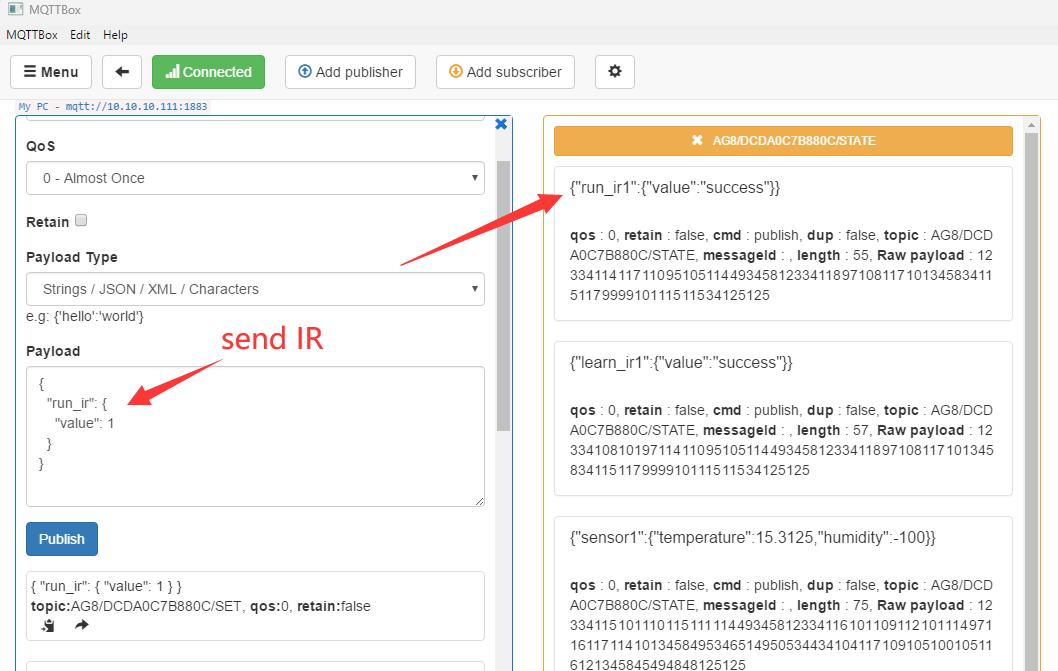
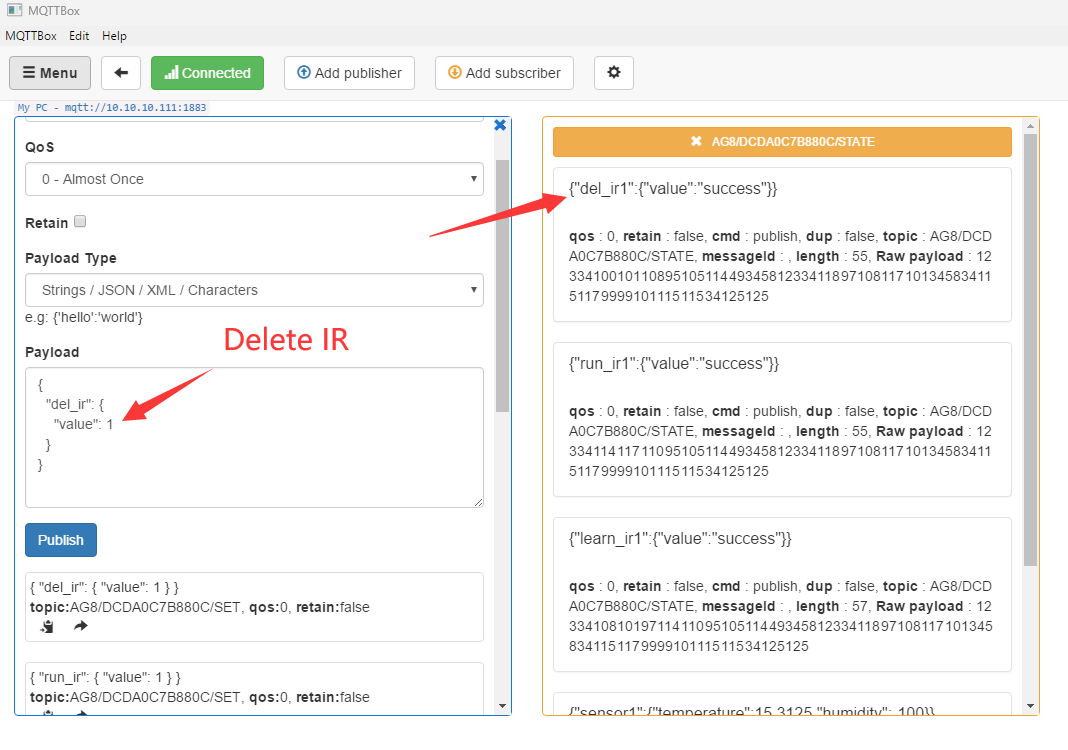
Delete IR: // delete learned IR signal ID=1
payload:
{
"run_ir": {
"value": 1
}
}
IR triggered and auto feedback: // trigger when value=1 (ONLY use for NEC and RC5 IR code)
payload:
// trigger begin
{
"ir1": {
"value": 1
}
}
// trigger end
{
"ir1": {
"value": 0
}
}
---------------------------------------------------------------
RS485 Modbus
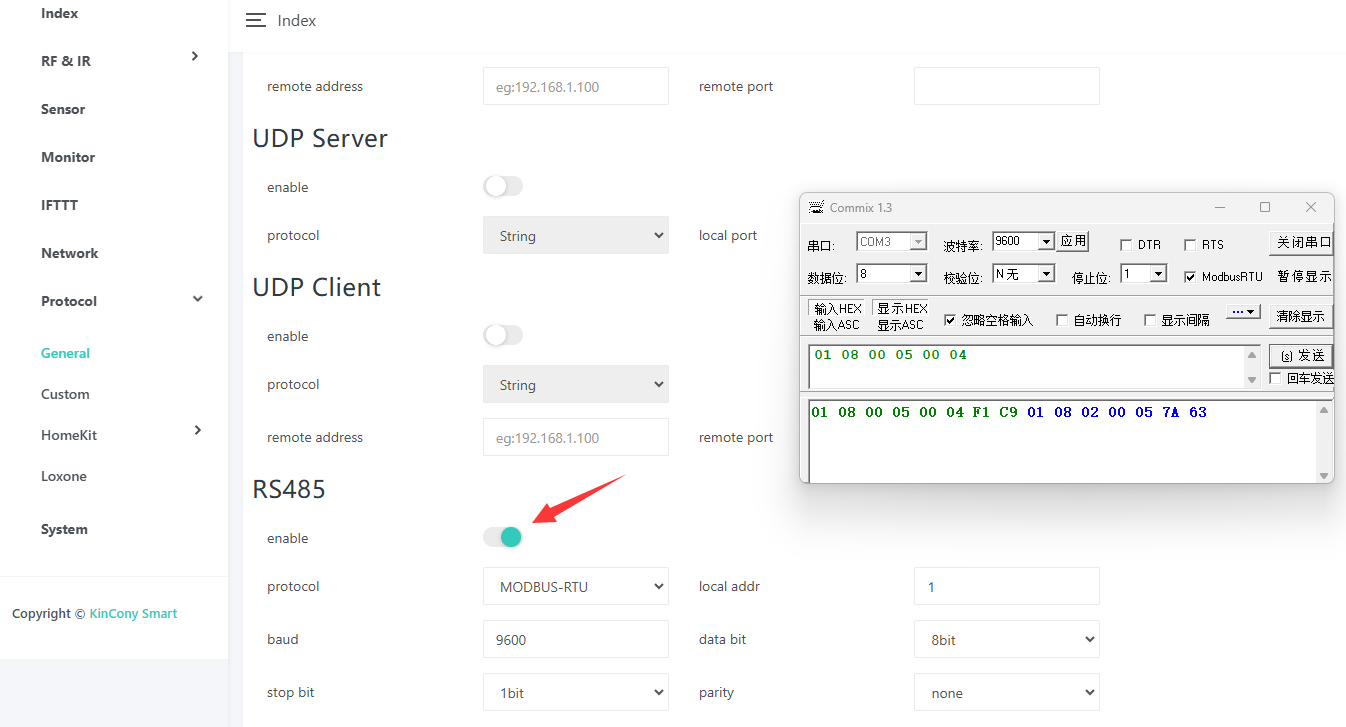
// 01: Address
// 08: Function code - Learn IR
// 00 05: Register address, 05 means ID=6 because ID begin with 0
// 00 04: Send IR tube, values range from 1-8. 04 means the 4th channel
// F1 C9: CRC
[Tx] 01 08 00 05 00 04 F1 C9
// 01: Address
// 08: Function code - Learn IR
// 02: Data length
// 00 05: Data value, corresponding to the register address when transmitting
// 7A 63: CRC
[Rx] 01 08 02 00 05 7A 63
---------------------------
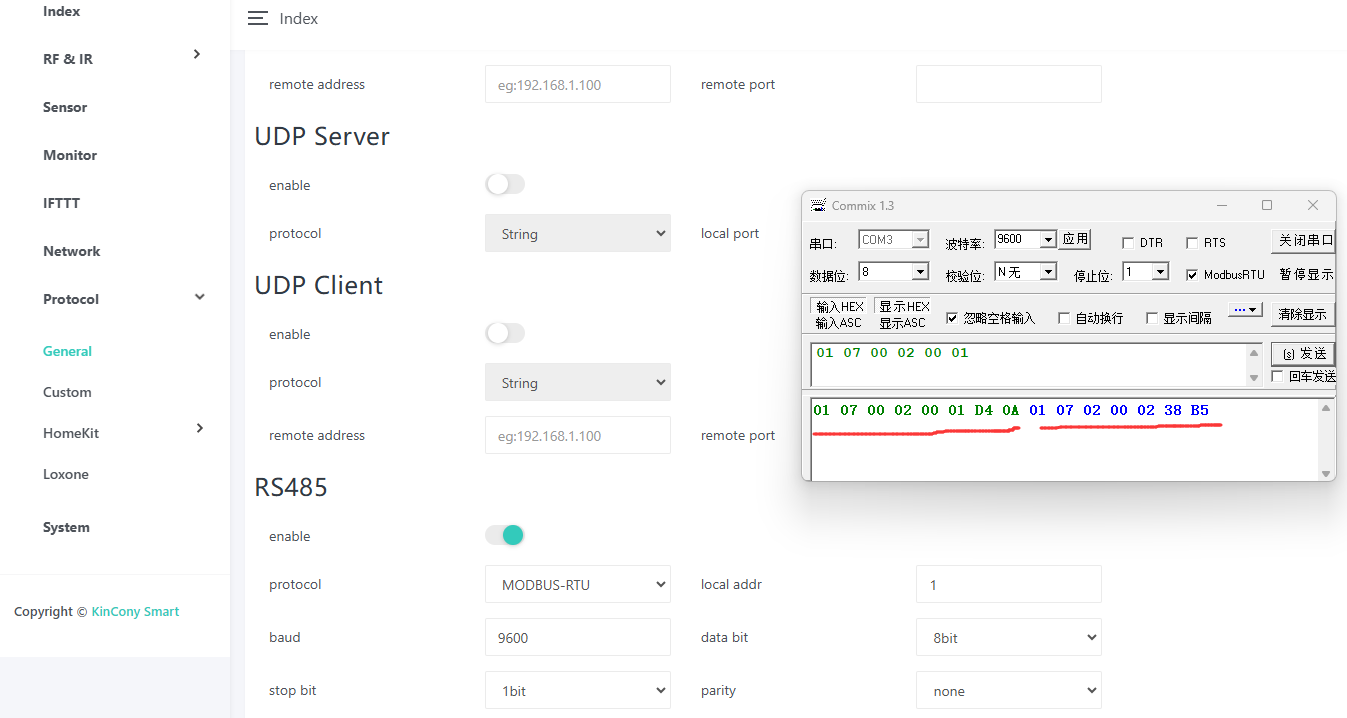
// 01: Address
// 07: Function code - Send IR
// 00 02: Register address, send IR at index 2, which ID=3
// 00 01: Register count, fixed value 1, only one infrared can be controlled at a time
// D4 0A: CRC
[Tx] 01 07 00 02 00 01 D4 0A
// 01: Address
// 07: Function code - Send IR
// 02: Data length
// 00 02: Data value, corresponding to the register address when transmitting
// 38 B5: CRC
[Rx] 01 07 02 00 02 38 B5
---------------------------
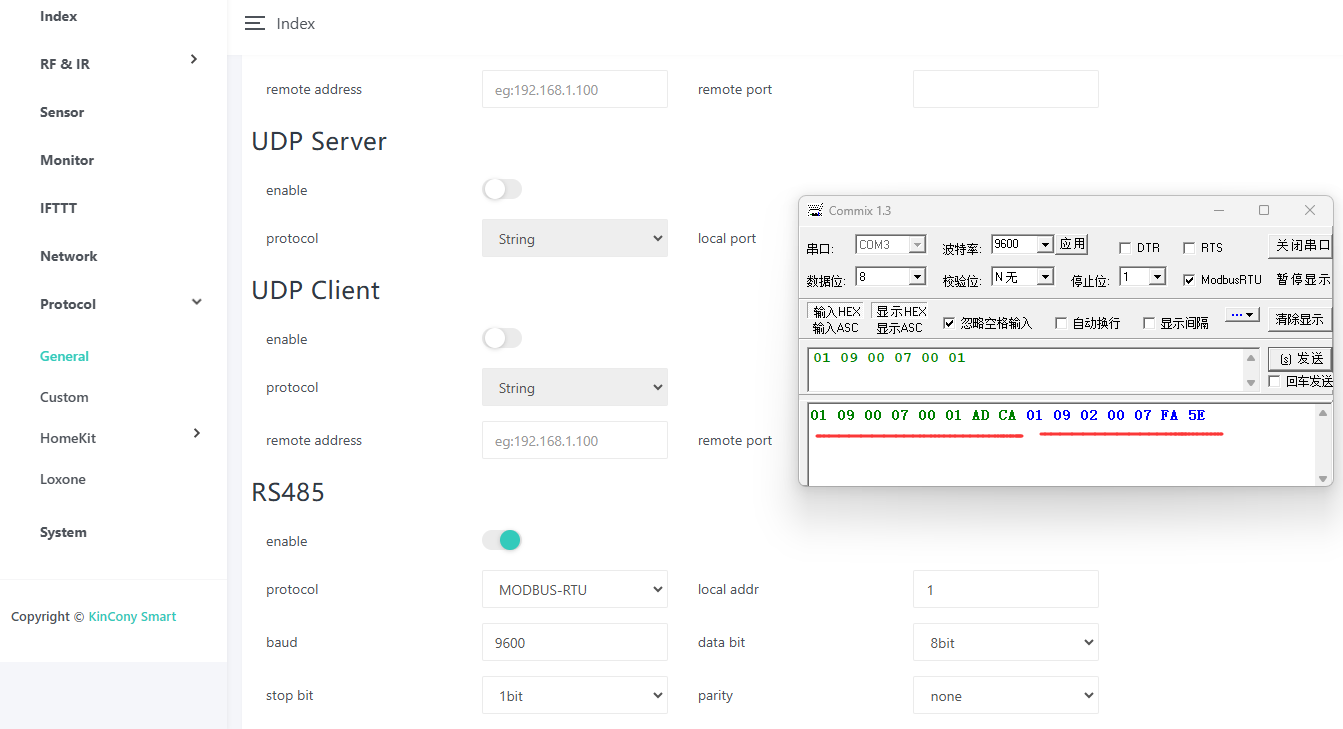
// 01: Address
// 09: Function code - Delete IR
// 00 07: Register address, 07 means ID=8
// 00 01: Register count, fixed value 1, only one infrared can be deleted at a time
// AD CA: CRC
[Tx][11:32:00.669] 01 09 00 07 00 01 AD CA
// 01: Address
// 09: Function code - Delete IR
// 02: Data length
// 00 07: Data value, corresponding to the register address when transmitting
// FA 5E: CRC
[Rx][11:32:01.959] 01 09 02 00 07 FA 5E
Learn IR (MAX support 192 IR signals):
send: RELAY-IR-LEARN-255,1,2 // begin learn IR signal ID=1, send by IR tube-2
receive: RELAY-IR-LEARN-255,1,OK // success
receive: RELAY-IR-LEARN-255,1,TIMEOUT // timeout
send: RELAY-IR-LEARN-255,200 // if send IR exceeding the maximum IR ID(MAX=192)
receive: RELAY-IR-LEARN-255,200,ERROR // error
Send IR:
send: RELAY-IR-RUN-255,1 // send IR signal ID=1
receive: RELAY-IR-RUN-255,1,OK
Delete IR:
send: RELAY-IR-DEL-255,1 // delete learned IR signal ID=1
receive: RELAY-IR-DEL-255,1,OK
---------------------------------------------------------------
UDP Client / TCP Client / Loxone / RS232:
IR triggered and auto feedback: (ONLY use for NEC and RC5 IR code)
RELAY-GET_IR-255,1,1,OK // trigger
RELAY-GET_IR-255,1,0,OK // not trigger
---------------------------------------------------------------
MQTT:
Learn IR: // begin learn IR signal ID=1, send by IR tube-2
payload:
{
"learn_ir": {
"value": 1,
"tx_channel": 2
}
}
Delete IR: // delete learned IR signal ID=1
payload:
{
"run_ir": {
"value": 1
}
}
IR triggered and auto feedback: // trigger when value=1 (ONLY use for NEC and RC5 IR code)
payload:
// trigger begin
{
"ir1": {
"value": 1
}
}
// trigger end
{
"ir1": {
"value": 0
}
}
---------------------------------------------------------------
RS485 Modbus
// 01: Address
// 08: Function code - Learn IR
// 00 05: Register address, 05 means ID=6 because ID begin with 0
// 00 04: Send IR tube, values range from 1-8. 04 means the 4th channel
// F1 C9: CRC
[Tx] 01 08 00 05 00 04 F1 C9
// 01: Address
// 08: Function code - Learn IR
// 02: Data length
// 00 05: Data value, corresponding to the register address when transmitting
// 7A 63: CRC
[Rx] 01 08 02 00 05 7A 63
---------------------------
// 01: Address
// 07: Function code - Send IR
// 00 02: Register address, send IR at index 2, which ID=3
// 00 01: Register count, fixed value 1, only one infrared can be controlled at a time
// D4 0A: CRC
[Tx] 01 07 00 02 00 01 D4 0A
// 01: Address
// 07: Function code - Send IR
// 02: Data length
// 00 02: Data value, corresponding to the register address when transmitting
// 38 B5: CRC
[Rx] 01 07 02 00 02 38 B5
---------------------------
// 01: Address
// 09: Function code - Delete IR
// 00 07: Register address, 07 means ID=8
// 00 01: Register count, fixed value 1, only one infrared can be deleted at a time
// AD CA: CRC
[Tx][11:32:00.669] 01 09 00 07 00 01 AD CA
// 01: Address
// 09: Function code - Delete IR
// 02: Data length
// 00 07: Data value, corresponding to the register address when transmitting
// FA 5E: CRC
[Rx][11:32:01.959] 01 09 02 00 07 FA 5E
YouTube: https://www.youtube.com/c/KinCony
Online Store: https://shop.kincony.com
Alibaba Store: https://kincony.en.alibaba.com/
Online Store: https://shop.kincony.com
Alibaba Store: https://kincony.en.alibaba.com/