




#include "PinDefinitionsAndMore.h"
#include <IRremote.h>
void setup() {
Serial.begin(9600);
IrReceiver.begin(IR_RECEIVE_PIN, ENABLE_LED_FEEDBACK, USE_DEFAULT_FEEDBACK_LED_PIN);
}
void loop() {
if (IrReceiver.decode()) {
IrReceiver.printIRResultShort(&Serial);
if (IrReceiver.decodedIRData.protocol == UNKNOWN) {
IrReceiver.printIRResultRawFormatted(&Serial, true);
}
Serial.println();
IrReceiver.resume();
}
}
download arduino IDE source code file:
 Uair_IR_receive.zip (Size: 569 bytes / Downloads: 952)
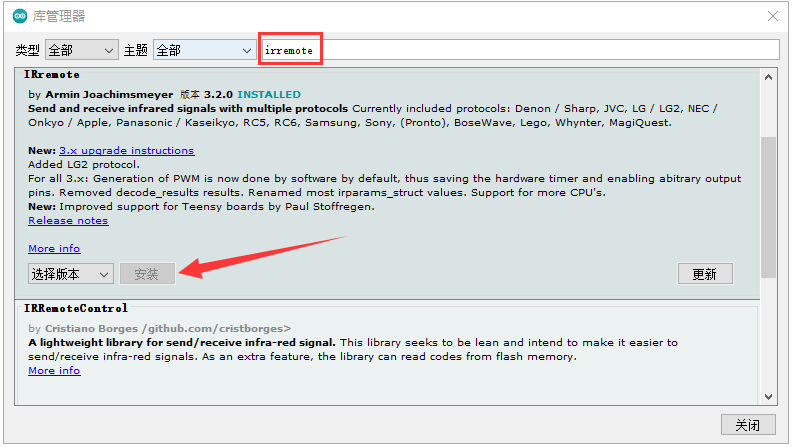
Note: install "IRremote" library online firstly.
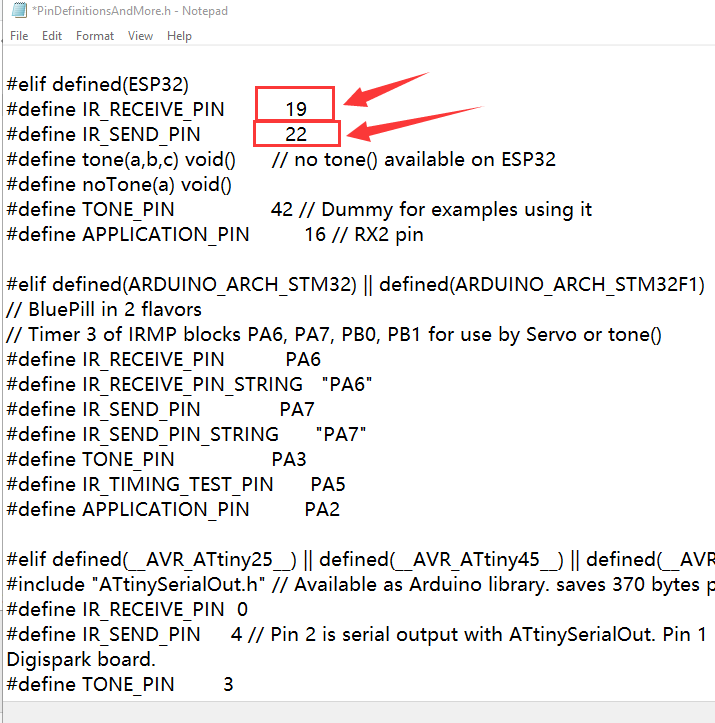
set IR sender and receiver GPIO pins define as below image:
#include <IRremote.h>
void setup() {
Serial.begin(9600);
IrReceiver.begin(IR_RECEIVE_PIN, ENABLE_LED_FEEDBACK, USE_DEFAULT_FEEDBACK_LED_PIN);
}
void loop() {
if (IrReceiver.decode()) {
IrReceiver.printIRResultShort(&Serial);
if (IrReceiver.decodedIRData.protocol == UNKNOWN) {
IrReceiver.printIRResultRawFormatted(&Serial, true);
}
Serial.println();
IrReceiver.resume();
}
}
download arduino IDE source code file:
Uair_IR_receive.zip (Size: 569 bytes / Downloads: 952)
Note: install "IRremote" library online firstly.
set IR sender and receiver GPIO pins define as below image:
YouTube: https://www.youtube.com/c/KinCony
Online Store: https://shop.kincony.com
Alibaba Store: https://kincony.en.alibaba.com/
Online Store: https://shop.kincony.com
Alibaba Store: https://kincony.en.alibaba.com/