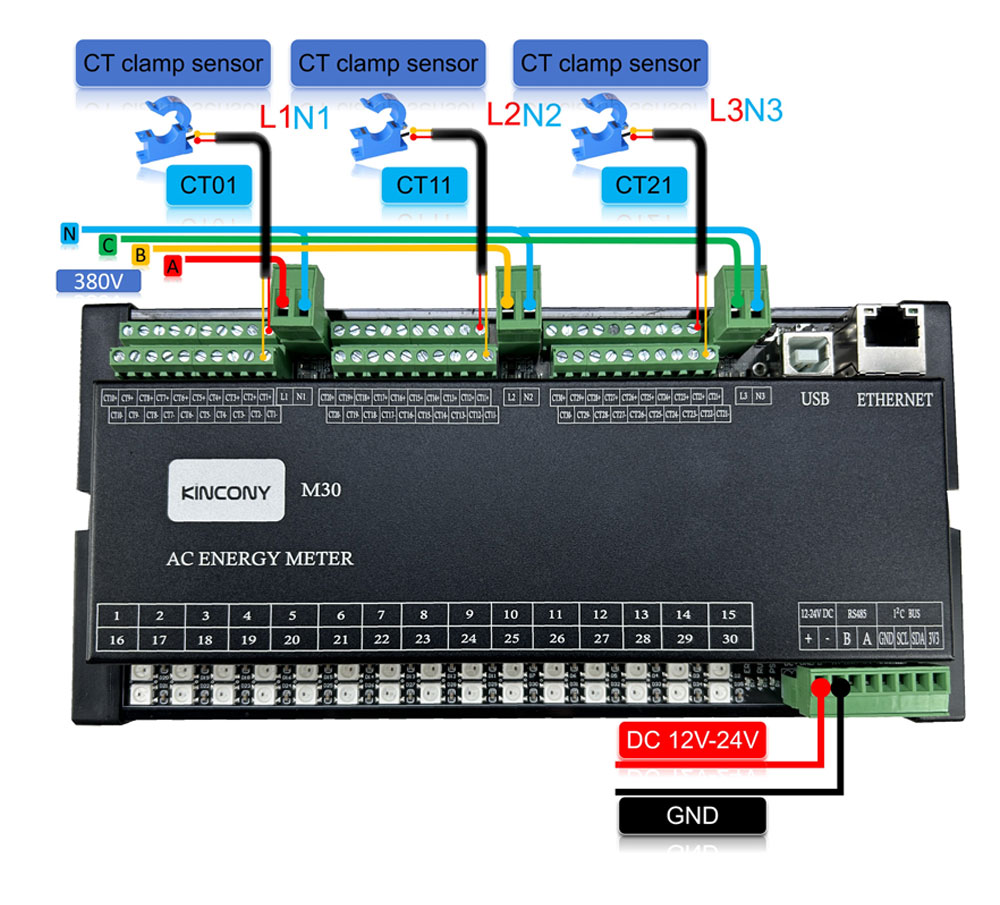
Code:
#include <Arduino.h>

#include <TuyaWifi.h>


TuyaWifi my_device;


/* Current LED status */

unsigned char led_state = 0;

/* Connect network button pin */

int key_pin = 27;


/* Data point define */

#define DPID_SWITCH_1   1

#define DPID_SWITCH_2   2

#define DPID_SWITCH_3   3

#define DPID_SWITCH_4   4

#define DPID_SWITCH_5   5

#define DPID_SWITCH_6   6

#define DPID_SWITCH_7   113

#define DPID_SWITCH_8   114

#define DPID_SWITCH_9   115

#define DPID_SWITCH_10  116

#define DPID_SWITCH_11  117

#define DPID_SWITCH_12  118

#define DPID_SWITCH_13  119

#define DPID_SWITCH_14  120

#define DPID_SWITCH_15  121

#define DPID_SWITCH_16  122

#define DPID_SWITCH_17  123

#define DPID_SWITCH_18  124

#define DPID_SWITCH_19  125

#define DPID_SWITCH_20  126

#define DPID_SWITCH_21  127

#define DPID_SWITCH_22  128

#define DPID_SWITCH_23  129

#define DPID_SWITCH_24  130

#define DPID_SWITCH_25  131

#define DPID_SWITCH_26  132

#define DPID_SWITCH_27  133

#define DPID_SWITCH_28  134

#define DPID_SWITCH_29  135

#define DPID_SWITCH_30  136

#define DPID_SWITCH_31  137

#define DPID_SWITCH_32  138


#define LED_WiFi  26

#define LED_User  33


unsigned char switch_1_state = 0;

unsigned char switch_2_state = 0;

unsigned char switch_3_state = 0;

unsigned char switch_4_state = 0;

unsigned char switch_5_state = 0;

unsigned char switch_6_state = 0;


unsigned char switch_7_state = 0;

unsigned char switch_8_state = 0;

unsigned char switch_9_state = 0;

unsigned char switch_10_state = 0;

unsigned char switch_11_state = 0;

unsigned char switch_12_state = 0;

unsigned char switch_13_state = 0;

unsigned char switch_14_state = 0;

unsigned char switch_15_state = 0;

unsigned char switch_16_state = 0;

unsigned char switch_17_state = 0;

unsigned char switch_18_state = 0;

unsigned char switch_19_state = 0;

unsigned char switch_20_state = 0;

unsigned char switch_21_state = 0;

unsigned char switch_22_state = 0;

unsigned char switch_23_state = 0;

unsigned char switch_24_state = 0;

unsigned char switch_25_state = 0;

unsigned char switch_26_state = 0;

unsigned char switch_27_state = 0;

unsigned char switch_28_state = 0;

unsigned char switch_29_state = 0;

unsigned char switch_30_state = 0;

unsigned char switch_31_state = 0;

unsigned char switch_32_state = 0;


/* Stores all DPs and their types. PS: array[][0]:dpid, array[][1]:dp type.

 *                                     dp type(TuyaDefs.h) : DP_TYPE_RAW, DP_TYPE_BOOL, DP_TYPE_VALUE, DP_TYPE_STRING, DP_TYPE_ENUM, DP_TYPE_BITMAP

*/

unsigned char dp_array[][2] =

{

  {DPID_SWITCH_1, DP_TYPE_BOOL},{DPID_SWITCH_2, DP_TYPE_BOOL},{DPID_SWITCH_3, DP_TYPE_BOOL},{DPID_SWITCH_4, DP_TYPE_BOOL},{DPID_SWITCH_5, DP_TYPE_BOOL},{DPID_SWITCH_6, DP_TYPE_BOOL},

  {DPID_SWITCH_7, DP_TYPE_BOOL},{DPID_SWITCH_8, DP_TYPE_BOOL},{DPID_SWITCH_9, DP_TYPE_BOOL},{DPID_SWITCH_10, DP_TYPE_BOOL},{DPID_SWITCH_11, DP_TYPE_BOOL},{DPID_SWITCH_12, DP_TYPE_BOOL},

  {DPID_SWITCH_13, DP_TYPE_BOOL},{DPID_SWITCH_14, DP_TYPE_BOOL},{DPID_SWITCH_15, DP_TYPE_BOOL},{DPID_SWITCH_16, DP_TYPE_BOOL},{DPID_SWITCH_17, DP_TYPE_BOOL},{DPID_SWITCH_18, DP_TYPE_BOOL},

  {DPID_SWITCH_19, DP_TYPE_BOOL},{DPID_SWITCH_20, DP_TYPE_BOOL},{DPID_SWITCH_21, DP_TYPE_BOOL},{DPID_SWITCH_22, DP_TYPE_BOOL},{DPID_SWITCH_23, DP_TYPE_BOOL},{DPID_SWITCH_24, DP_TYPE_BOOL},

  {DPID_SWITCH_25, DP_TYPE_BOOL},{DPID_SWITCH_26, DP_TYPE_BOOL},{DPID_SWITCH_27, DP_TYPE_BOOL},{DPID_SWITCH_28, DP_TYPE_BOOL},{DPID_SWITCH_29, DP_TYPE_BOOL},{DPID_SWITCH_30, DP_TYPE_BOOL},

 {DPID_SWITCH_31, DP_TYPE_BOOL},{DPID_SWITCH_32, DP_TYPE_BOOL},

};


unsigned char pid[] = {"tsfqvoyi6pxqxq6o"};

unsigned char mcu_ver[] = {"1.0.0"};


/* last time */

unsigned long last_time = 0;


void setup()

{

  // Serial with tuyawifi

  Serial.begin(9600,SERIAL_8N1,14,13);


  //Initialize led port, turn off led.

  pinMode(LED_WiFi, OUTPUT);

  digitalWrite(LED_WiFi, LOW);


  pinMode(LED_User, OUTPUT);

  digitalWrite(LED_User, LOW);


  //Initialize networking keys.

  pinMode(key_pin, INPUT_PULLUP);


  //Enter the PID and MCU software version

  my_device.init(pid, mcu_ver);

  //incoming all DPs and their types array, DP numbers

  my_device.set_dp_cmd_total(dp_array, 1);

  //register DP download processing callback function

  my_device.dp_process_func_register(dp_process);

  //register upload all DP callback function

  my_device.dp_update_all_func_register(dp_update_all);


  last_time = millis();

}


void loop()

{

  my_device.uart_service();


  //Enter the connection network mode when Pin7 is pressed.

  if (digitalRead(key_pin) == LOW) {

    delay(80);

    if (digitalRead(key_pin) == LOW) {

      my_device.mcu_set_wifi_mode(SMART_CONFIG);

    }

  }

  /* LED blinks when network is being connected */

  if ((my_device.mcu_get_wifi_work_state() != WIFI_LOW_POWER) && (my_device.mcu_get_wifi_work_state() != WIFI_CONN_CLOUD) && (my_device.mcu_get_wifi_work_state() != WIFI_SATE_UNKNOW)) {

    if (millis()- last_time >= 500) {

      last_time = millis();


      if (led_state == LOW) {

        led_state = HIGH;

      } else {

        led_state = LOW;

      }

      digitalWrite(LED_WiFi, led_state);

    }

  }


  delay(10);

}


/**

 * @description: DP download callback function.

 * @param {unsigned char} dpid

 * @param {const unsigned char} value

 * @param {unsigned short} length

 * @return {unsigned char}

 */

unsigned char dp_process(unsigned char dpid,const unsigned char value[], unsigned short length)

{

  switch(dpid) {

    case DPID_SWITCH_1:

      switch_1_state = my_device.mcu_get_dp_download_data(dpid, value, length); /* Get the value of the down DP command */

      //Status changes should be reported.

      my_device.mcu_dp_update(DPID_SWITCH_1, switch_1_state, length);

    break;

    case DPID_SWITCH_2:

      switch_2_state = my_device.mcu_get_dp_download_data(dpid, value, length); /* Get the value of the down DP command */

      //Status changes should be reported.

      my_device.mcu_dp_update(DPID_SWITCH_2, switch_2_state, length);

    break;

    case DPID_SWITCH_3:

      switch_3_state = my_device.mcu_get_dp_download_data(dpid, value, length); /* Get the value of the down DP command */

      //Status changes should be reported.

      my_device.mcu_dp_update(DPID_SWITCH_3, switch_3_state, length);

    break;

    case DPID_SWITCH_4:

      switch_4_state = my_device.mcu_get_dp_download_data(dpid, value, length); /* Get the value of the down DP command */

      //Status changes should be reported.

      my_device.mcu_dp_update(DPID_SWITCH_4, switch_4_state, length);

    break;

    case DPID_SWITCH_5:

      switch_5_state = my_device.mcu_get_dp_download_data(dpid, value, length); /* Get the value of the down DP command */

      //Status changes should be reported.

      my_device.mcu_dp_update(DPID_SWITCH_5, switch_5_state, length);

    break;

    case DPID_SWITCH_6:

      switch_6_state = my_device.mcu_get_dp_download_data(dpid, value, length); /* Get the value of the down DP command */

      //Status changes should be reported.

      my_device.mcu_dp_update(DPID_SWITCH_6, switch_6_state, length);

    break;

    case DPID_SWITCH_7:

      switch_7_state = my_device.mcu_get_dp_download_data(dpid, value, length); /* Get the value of the down DP command */

      //Status changes should be reported.

      my_device.mcu_dp_update(DPID_SWITCH_7, switch_7_state, length);

    break;

    case DPID_SWITCH_8:

      switch_8_state = my_device.mcu_get_dp_download_data(dpid, value, length); /* Get the value of the down DP command */

      //Status changes should be reported.

      my_device.mcu_dp_update(DPID_SWITCH_8, switch_8_state, length);

    break;

    case DPID_SWITCH_9:

      switch_9_state = my_device.mcu_get_dp_download_data(dpid, value, length); /* Get the value of the down DP command */

      //Status changes should be reported.

      my_device.mcu_dp_update(DPID_SWITCH_9, switch_9_state, length);

    break;

    case DPID_SWITCH_10:

      switch_10_state = my_device.mcu_get_dp_download_data(dpid, value, length); /* Get the value of the down DP command */

      //Status changes should be reported.

      my_device.mcu_dp_update(DPID_SWITCH_10, switch_10_state, length);

    break;

    case DPID_SWITCH_11:

      switch_11_state = my_device.mcu_get_dp_download_data(dpid, value, length); /* Get the value of the down DP command */

      //Status changes should be reported.

      my_device.mcu_dp_update(DPID_SWITCH_11, switch_11_state, length);

    break;

    case DPID_SWITCH_12:

      switch_12_state = my_device.mcu_get_dp_download_data(dpid, value, length); /* Get the value of the down DP command */

      //Status changes should be reported.

      my_device.mcu_dp_update(DPID_SWITCH_12, switch_12_state, length);

    break;

    case DPID_SWITCH_13:

      switch_13_state = my_device.mcu_get_dp_download_data(dpid, value, length); /* Get the value of the down DP command */

      //Status changes should be reported.

      my_device.mcu_dp_update(DPID_SWITCH_13, switch_13_state, length);

    break;

    case DPID_SWITCH_14:

      switch_14_state = my_device.mcu_get_dp_download_data(dpid, value, length); /* Get the value of the down DP command */

      //Status changes should be reported.

      my_device.mcu_dp_update(DPID_SWITCH_14, switch_14_state, length);

    break;

    case DPID_SWITCH_15:

      switch_15_state = my_device.mcu_get_dp_download_data(dpid, value, length); /* Get the value of the down DP command */

      //Status changes should be reported.

      my_device.mcu_dp_update(DPID_SWITCH_15, switch_15_state, length);

    break;

    case DPID_SWITCH_16:

      switch_16_state = my_device.mcu_get_dp_download_data(dpid, value, length); /* Get the value of the down DP command */

      //Status changes should be reported.

      my_device.mcu_dp_update(DPID_SWITCH_16, switch_16_state, length);

    break;

    case DPID_SWITCH_17:

      switch_17_state = my_device.mcu_get_dp_download_data(dpid, value, length); /* Get the value of the down DP command */

      //Status changes should be reported.

      my_device.mcu_dp_update(DPID_SWITCH_17, switch_17_state, length);

    break;

    case DPID_SWITCH_18:

      switch_18_state = my_device.mcu_get_dp_download_data(dpid, value, length); /* Get the value of the down DP command */

      //Status changes should be reported.

      my_device.mcu_dp_update(DPID_SWITCH_18, switch_18_state, length);

    break;

    case DPID_SWITCH_19:

      switch_19_state = my_device.mcu_get_dp_download_data(dpid, value, length); /* Get the value of the down DP command */

      //Status changes should be reported.

      my_device.mcu_dp_update(DPID_SWITCH_19, switch_19_state, length);

    break;

    case DPID_SWITCH_20:

      switch_20_state = my_device.mcu_get_dp_download_data(dpid, value, length); /* Get the value of the down DP command */

      //Status changes should be reported.

      my_device.mcu_dp_update(DPID_SWITCH_20, switch_20_state, length);

    break;

    case DPID_SWITCH_21:

      switch_21_state = my_device.mcu_get_dp_download_data(dpid, value, length); /* Get the value of the down DP command */

      //Status changes should be reported.

      my_device.mcu_dp_update(DPID_SWITCH_21, switch_21_state, length);

    break;

    case DPID_SWITCH_22:

      switch_22_state = my_device.mcu_get_dp_download_data(dpid, value, length); /* Get the value of the down DP command */

      //Status changes should be reported.

      my_device.mcu_dp_update(DPID_SWITCH_22, switch_22_state, length);

    break;

    case DPID_SWITCH_23:

      switch_23_state = my_device.mcu_get_dp_download_data(dpid, value, length); /* Get the value of the down DP command */

      //Status changes should be reported.

      my_device.mcu_dp_update(DPID_SWITCH_23, switch_23_state, length);

    break;

    case DPID_SWITCH_24:

      switch_24_state = my_device.mcu_get_dp_download_data(dpid, value, length); /* Get the value of the down DP command */

      //Status changes should be reported.

      my_device.mcu_dp_update(DPID_SWITCH_24, switch_24_state, length);

    break;

    case DPID_SWITCH_25:

      switch_25_state = my_device.mcu_get_dp_download_data(dpid, value, length); /* Get the value of the down DP command */

      //Status changes should be reported.

      my_device.mcu_dp_update(DPID_SWITCH_25, switch_25_state, length);

    break;

    case DPID_SWITCH_26:

      switch_26_state = my_device.mcu_get_dp_download_data(dpid, value, length); /* Get the value of the down DP command */

      //Status changes should be reported.

      my_device.mcu_dp_update(DPID_SWITCH_26, switch_26_state, length);

    break;

    case DPID_SWITCH_27:

      switch_27_state = my_device.mcu_get_dp_download_data(dpid, value, length); /* Get the value of the down DP command */

      //Status changes should be reported.

      my_device.mcu_dp_update(DPID_SWITCH_27, switch_27_state, length);

    break;

    case DPID_SWITCH_28:

      switch_28_state = my_device.mcu_get_dp_download_data(dpid, value, length); /* Get the value of the down DP command */

      //Status changes should be reported.

      my_device.mcu_dp_update(DPID_SWITCH_28, switch_28_state, length);

    break;

    case DPID_SWITCH_29:

      switch_29_state = my_device.mcu_get_dp_download_data(dpid, value, length); /* Get the value of the down DP command */

      //Status changes should be reported.

      my_device.mcu_dp_update(DPID_SWITCH_29, switch_29_state, length);

    break;

    case DPID_SWITCH_30:

      switch_30_state = my_device.mcu_get_dp_download_data(dpid, value, length); /* Get the value of the down DP command */

      //Status changes should be reported.

      my_device.mcu_dp_update(DPID_SWITCH_30, switch_30_state, length);

    break;

    case DPID_SWITCH_31:

      switch_31_state = my_device.mcu_get_dp_download_data(dpid, value, length); /* Get the value of the down DP command */

      //Status changes should be reported.

      my_device.mcu_dp_update(DPID_SWITCH_31, switch_31_state, length);

    break;

    case DPID_SWITCH_32:

      switch_32_state = my_device.mcu_get_dp_download_data(dpid, value, length); /* Get the value of the down DP command */

      //Status changes should be reported.

      my_device.mcu_dp_update(DPID_SWITCH_32, switch_32_state, length);

    break;


    default:break;

  }

  return TY_SUCCESS;

}


/**

 * @description: Upload all DP status of the current device.

 * @param {*}

 * @return {*}

 */

void dp_update_all(void)

{

  my_device.mcu_dp_update(DPID_SWITCH_1, switch_1_state, 1);

  my_device.mcu_dp_update(DPID_SWITCH_2, switch_2_state, 1);

  my_device.mcu_dp_update(DPID_SWITCH_3, switch_3_state, 1);

  my_device.mcu_dp_update(DPID_SWITCH_4, switch_4_state, 1);

  my_device.mcu_dp_update(DPID_SWITCH_5, switch_5_state, 1);

  my_device.mcu_dp_update(DPID_SWITCH_6, switch_6_state, 1);

  my_device.mcu_dp_update(DPID_SWITCH_7, switch_7_state, 1);

  my_device.mcu_dp_update(DPID_SWITCH_8, switch_8_state, 1);

  my_device.mcu_dp_update(DPID_SWITCH_9, switch_9_state, 1);

  my_device.mcu_dp_update(DPID_SWITCH_10, switch_10_state, 1);

  my_device.mcu_dp_update(DPID_SWITCH_11, switch_11_state, 1);

  my_device.mcu_dp_update(DPID_SWITCH_12, switch_12_state, 1);

  my_device.mcu_dp_update(DPID_SWITCH_13, switch_13_state, 1);

  my_device.mcu_dp_update(DPID_SWITCH_14, switch_14_state, 1);

  my_device.mcu_dp_update(DPID_SWITCH_15, switch_15_state, 1);

  my_device.mcu_dp_update(DPID_SWITCH_16, switch_16_state, 1);

  my_device.mcu_dp_update(DPID_SWITCH_17, switch_17_state, 1);

  my_device.mcu_dp_update(DPID_SWITCH_18, switch_18_state, 1);

  my_device.mcu_dp_update(DPID_SWITCH_19, switch_19_state, 1);

  my_device.mcu_dp_update(DPID_SWITCH_20, switch_20_state, 1);

  my_device.mcu_dp_update(DPID_SWITCH_21, switch_21_state, 1);

  my_device.mcu_dp_update(DPID_SWITCH_22, switch_22_state, 1);

  my_device.mcu_dp_update(DPID_SWITCH_23, switch_23_state, 1);

  my_device.mcu_dp_update(DPID_SWITCH_24, switch_24_state, 1);

  my_device.mcu_dp_update(DPID_SWITCH_25, switch_25_state, 1);

  my_device.mcu_dp_update(DPID_SWITCH_26, switch_26_state, 1);

  my_device.mcu_dp_update(DPID_SWITCH_27, switch_27_state, 1);

  my_device.mcu_dp_update(DPID_SWITCH_28, switch_28_state, 1);

  my_device.mcu_dp_update(DPID_SWITCH_29, switch_29_state, 1);

  my_device.mcu_dp_update(DPID_SWITCH_30, switch_30_state, 1);

  my_device.mcu_dp_update(DPID_SWITCH_31, switch_31_state, 1);

  my_device.mcu_dp_update(DPID_SWITCH_32, switch_32_state, 1);

}