 |
Code: /*
* Made by KinCony IoT: https://www.kincony.com
*
* Demo Program for Reading Data from KinCony N60 Energy Meter (60-channel version)
* via RS485 Modbus using ESP32 and NonBlockingModbusMaster library.
*
* This example:
* - Initializes RS485 Modbus communication
* - Reads current, power, energy, voltage, frequency, temperature, power factor from 6 chips
* - Prints all data to Serial Monitor
* - Uses TaskScheduler to run periodic tasks
*/
#include "TaskScheduler.h"
#include "HardwareSerial.h"
//#include "modbus-rtu.h"
#include "NonBlockingModbusMaster.h" // Include non-blocking Modbus master library
/////defined anything here====================
#define MAX_U16DATA_LEN 68 // Number of 16-bit registers to read per chip
// Define RS485 serial and control pins
#define TX_PIN 8
#define DE_PIN 3
#define RX_PIN 18
// Define Modbus function codes
typedef enum{
FC_READ_COIL = 1,
FC_READ_HOLDREG = 3,
FC_READ_INPUTREG = 4,
FC_FORCE_COIL = 5,
FC_FORCE_COILS = 15,
FC_WRITE_REG = 6,
FC_WRITE_REGS = 16,
}FC_DEF;
// Define structure to hold all the electrical parameters per chip
typedef struct
{
uint32_t RMS_1; //0 //XX.XXX A 0.001A/LSB
uint32_t RMS_2;
uint32_t RMS_3;
uint32_t RMS_4;
uint32_t RMS_5;
uint32_t RMS_6;
uint32_t RMS_7;
uint32_t RMS_8;
uint32_t RMS_9;
uint32_t RMS_10;
uint32_t WATT_1; //20 XXXX.X W 0.1W/LSB
uint32_t WATT_2;
uint32_t WATT_3;
uint32_t WATT_4;
uint32_t WATT_5;
uint32_t WATT_6;
uint32_t WATT_7;
uint32_t WATT_8;
uint32_t WATT_9;
uint32_t WATT_10;//
uint32_t Energy_1; //40 XXXXXX kWh 1kWh/LSB,MAX:65535kWh
uint32_t Energy_2;
uint32_t Energy_3;
uint32_t Energy_4;
uint32_t Energy_5;
uint32_t Energy_6;
uint32_t Energy_7;
uint32_t Energy_8;
uint32_t Energy_9;
uint32_t Energy_10; //
uint32_t Energy_Sum; //60
uint16_t RMS_V; //62 XXX.X V 0.01V/LSB
uint16_t Period; //63 XX.XX Hz 0.01Hz/LSB
float TPS1; //64 XX.XX ℃ 0.1℃/LSB
float PF; //66
}Elect_StructDef_JKE;
typedef union{
Elect_StructDef_JKE jke_n60_str[6]; ////6 chips each have MAX_STRU_LEN data
ushort read_regs_arr[6][MAX_U16DATA_LEN];
}COLLECT_UNION;
////define instance here================================================================
COLLECT_UNION jke_n60_data_union = {0};
HardwareSerial collectSerial(2);
Scheduler ts; // Task scheduler
NonBlockingModbusMaster nbModbusMaster;
////define macros here===================
static void collectAllChipData();
static void PrintfInfo();
////define my work task==================================
Task collectDataTask(200,TASK_FOREVER,[]()
{
collectAllChipData();
});
Task heartBeatTask(1000,TASK_FOREVER,[]()
{
////do anything in heartBeatTask to make sense for anyone or other.
Serial.println("heartbeat task is running.");
});
void setup() {
// put your setup code here, to run once:
// Open serial communications and wait for port to open:
Serial.begin(115200);
collectSerial.begin(115200,SERIAL_8N1,9,10);///RX & TX
float bitduration = 1.f / 115200;
float charlen = 10.0f; // 8 bits + 1 stop, parity ?
float preDelayBR = bitduration * charlen * 3.5f * 1e6 + 1; // in us
float postDelayBR = bitduration * charlen * 3.5f * 1e6 + 1; // in us
nbModbusMaster.initialize(collectSerial, preDelayBR, postDelayBR,1000);
////add task to scheduler
ts.addTask(collectDataTask);
ts.addTask(heartBeatTask);
////start task
collectDataTask.enable(); ///start task
heartBeatTask.enable();
}
bool isMbConnect = false;
int cnt_chip = 0;
void loop() {
static int retryCount = 0;
// put your main code here, to run repeatedly:
ts.execute();
if (nbModbusMaster.justFinished())
{
// check for errors
int err = nbModbusMaster.getError(); // 0 for OK
if (err) {
isMbConnect = false;
Serial.print("Error: "); nbModbusMaster.printHex(err, Serial); Serial.println();
if ((err == nbModbusMaster.ku8MBResponseTimedOut) ) {
retryCount++;
Serial.println("Mbtask Retry");
nbModbusMaster.retry(); // send same cmd again
}
} else {
retryCount = 0; // success
}
if (err == 0) {
isMbConnect = true;
if(cnt_chip==5)
{
PrintfInfo();
}
for (int i = 0; i < nbModbusMaster.getResponseBufferLength(); i++) {
jke_n60_data_union.read_regs_arr[cnt_chip][i] = nbModbusMaster.getResponseBuffer(i);
//nbModbusMaster.printHex(nbModbusMaster.getResponseBuffer(i), Serial); Serial.print(" ");
}
cnt_chip++;
if(cnt_chip >= 6) cnt_chip = 0;
}
}
}
static void PrintfInfo()
{
char send_buf[100] = {0};
uint32_t *ptr;
uint16_t *ptr2;
float *ptr3;
memset(send_buf,0,100);
///// PRINTF ALL DATA READ FROM CHIP REGISTER.
for(int j=0;j<6;j++)
{
sprintf(send_buf,">>chip/socket : %d Info:",j+1);
Serial.println(send_buf);
ptr= &jke_n60_data_union.jke_n60_str[j].RMS_1;
ptr2 = &jke_n60_data_union.jke_n60_str[j].RMS_V;
ptr3 = &jke_n60_data_union.jke_n60_str[j].TPS1;
for(int i=0;i<35;i++)
{
if(i < 10)
{
sprintf(send_buf,"RMS_%d: %.2f A,",i+1,*(ptr+i) * 0.001);
Serial.println(send_buf);
}
else if(i < 20)
{
sprintf(send_buf,"WATT_%d: %.2f W,",i+1-10,*(ptr+i) * 0.1);
Serial.println(send_buf);
}
else if(i < 30)
{
sprintf(send_buf,"Energy_%d: %d kWh,",i+1-20,*(ptr+i) );
Serial.println(send_buf);
}
else if(i == 30)
{
sprintf(send_buf,"Energy_sum: %d kWh,",*(ptr+i) );
Serial.println(send_buf);
memset(send_buf,0,100);
}
else if(i == 31)
{
sprintf(send_buf,"RMS_V: %.2f V,",*ptr2 *0.01); ///62
Serial.println(send_buf);
memset(send_buf,0,100);
}
else if(i == 32)
{
sprintf(send_buf,"Period: %.2f Hz,",*(ptr2+1) *0.01);
Serial.println(send_buf);
memset(send_buf,0,100);
}
else if(i == 33)
{
sprintf(send_buf,"Chip_Temp: %.1f ^C,",*ptr3 );
Serial.println(send_buf);
memset(send_buf,0,100);
}
else if(i == 34)
{
sprintf(send_buf,"PF: %.4f .",*(ptr3+1) );
Serial.println(send_buf);
memset(send_buf,0,100);
}
}
if(j==5)
Serial.println(">>Data Finished!>>");
}
}
static void collectAllChipData()
{
int read_addr_start = (cnt_chip+1) * 100;
String str = "";
uint16_t size = MAX_U16DATA_LEN;
nbModbusMaster.readHoldingRegisters(1, read_addr_start, size);
}
 collect_n60_data_demo.zip (Size: 2.45 KB / Downloads: 584)
BIN file (you can use esp32 download tool download to ESP32-S3 with address 0x0 then directly to use) download:
collect_n60_data_demo.ino.merged.zip (Size: 189.94 KB / Downloads: 634)
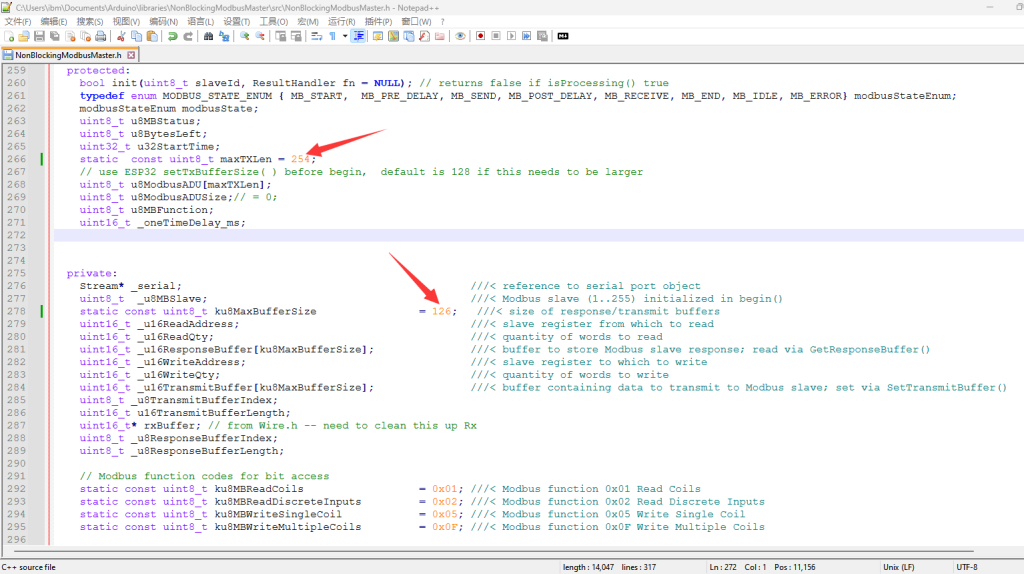
before run the code, you need to install NonBlockingModbusMaster arduino library.

modify library .h file replace the number as photo.
after running code, will print all data by USB port:
Code: y_5: 0 kWh,
Energy_6: 0 kWh,
Energy_7: 0 kWh,
Energy_8: 0 kWh,
Energy_9: 0 kWh,
Energy_10: 0 kWh,
RMS_V: 233.58 V,
Period: 49.70 Hz,
Chip_Temp: 25.5 ^C,
PF: 0.0000 .
>>Data Finished!>>
heartbeat task is running.
>>chip/socket : 1 Info:
RMS_1: 0.00 A,
RMS_2: 0.00 A,
RMS_3: 0.00 A,
RMS_4: 0.00 A,
RMS_5: 0.00 A,
RMS_6: 0.00 A,
RMS_7: 0.00 A,
RMS_8: 0.00 A,
RMS_9: 0.00 A,
RMS_10: 0.00 A,
WATT_1: 0.00 W,
WATT_2: 0.00 W,
WATT_3: 0.00 W,
WATT_4: 0.00 W,
WATT_5: 0.00 W,
WATT_6: 0.00 W,
WATT_7: 0.00 W,
WATT_8: 0.00 W,
WATT_9: 0.00 W,
WATT_10: 0.00 W,
Energy_1: 0 kWh,
Energy_2: 0 kWh,
Energy_3: 0 kWh,
Energy_4: 0 kWh,
Energy_5: 0 kWh,
Energy_6: 0 kWh,
Energy_7: 0 kWh,
Energy_8: 0 kWh,
Energy_9: 0 kWh,
Energy_10: 0 kWh,
Energy_sum: 0 kWh,
RMS_V: 0.00 V,
Period: 9.53 Hz,
Chip_Temp: 24.4 ^C,
PF: 0.0000 .
>>chip/socket : 2 Info:
RMS_1: 0.00 A,
RMS_2: 0.00 A,
RMS_3: 0.00 A,
RMS_4: 0.00 A,
RMS_5: 0.00 A,
RMS_6: 0.00 A,
RMS_7: 0.00 A,
RMS_8: 0.00 A,
RMS_9: 0.00 A,
RMS_10: 0.00 A,
WATT_1: 0.00 W,
WATT_2: 0.00 W,
WATT_3: 0.00 W,
WATT_4: 0.00 W,
WATT_5: 0.00 W,
WATT_6: 0.00 W,
WATT_7: 0.00 W,
WATT_8: 0.00 W,
WATT_9: 0.00 W,
WATT_10: 0.00 W,
Energy_1: 0 kWh,
Energy_2: 0 kWh,
Energy_3: 0 kWh,
Energy_4: 0 kWh,
Energy_5: 0 kWh,
Energy_6: 0 kWh,
Energy_7: 0 kWh,
Energy_8: 0 kWh,
Energy_9: 0 kWh,
Energy_10: 0 kWh,
Energy_sum: 0 kWh,
RMS_V: 0.00 V,
Period: 9.53 Hz,
Chip_Temp: 23.8 ^C,
PF: 0.0000 .
>>chip/socket : 3 Info:
RMS_1: 0.00 A,
RMS_2: 0.00 A,
RMS_3: 0.00 A,
RMS_4: 0.00 A,
RMS_5: 0.00 A,
RMS_6: 0.00 A,
RMS_7: 0.00 A,
RMS_8: 0.00 A,
RMS_9: 0.00 A,
RMS_10: 0.00 A,
WATT_1: 0.00 W,
WATT_2: 0.00 W,
WATT_3: 0.00 W,
WATT_4: 0.00 W,
WATT_5: 0.00 W,
WATT_6: 0.00 W,
WATT_7: 0.00 W,
WATT_8: 0.00 W,
WATT_9: 0.00 W,
WATT_10: 0.00 W,
Energy_1: 0 kWh,
Energy_2: 0 kWh,
Energy_3: 0 kWh,
Energy_4: 0 kWh,
Energy_5: 0 kWh,
Energy_6: 0 kWh,
Energy_7: 0 kWh,
Energy_8: 0 kWh,
Energy_9: 0 kWh,
Energy_10: 0 kWh,
Energy_sum: 0 kWh,
RMS_V: 0.00 V,
Period: 9.53 Hz,
Chip_Temp: 25.0 ^C,
PF: 0.0000 .
>>chip/socket : 4 Info:
RMS_1: 0.00 A,
RMS_2: 0.00 A,
RMS_3: 0.00 A,
RMS_4: 0.00 A,
RMS_5: 0.00 A,
RMS_6: 0.00 A,
RMS_7: 0.00 A,
RMS_8: 0.00 A,
RMS_9: 0.00 A,
RMS_10: 0.00 A,
WATT_1: 0.00 W,
WATT_2: 0.00 W,
WATT_3: 0.00 W,
WATT_4: 0.00 W,
WATT_5: 0.00 W,
WATT_6: 0.00 W,
WATT_7: 0.00 W,
WATT_8: 0.00 W,
WATT_9: 0.00 W,
WATT_10: 0.00 W,
Energy_1: 0 kWh,
Energy_2: 0 kWh,
Energy_3: 0 kWh,
Energy_4: 0 kWh,
Energy_5: 0 kWh,
Energy_6: 0 kWh,
Energy_7: 0 kWh,
Energy_8: 0 kWh,
Energy_9: 0 kWh,
Energy_10: 0 kWh,
Energy_sum: 0 kWh,
RMS_V: 0.00 V,
Period: 9.53 Hz,
Chip_Temp: 23.8 ^C,
PF: 0.0000 .
>>chip/socket : 5 Info:
RMS_1: 0.00 A,
RMS_2: 0.00 A,
RMS_3: 0.00 A,
RMS_4: 0.00 A,
RMS_5: 0.00 A,
RMS_6: 0.00 A,
RMS_7: 0.00 A,
RMS_8: 0.00 A,
RMS_9: 0.00 A,
RMS_10: 0.00 A,
WATT_1: 0.00 W,
WATT_2: 0.00 W,
WATT_3: 0.00 W,
WATT_4: 0.00 W,
WATT_5: 0.00 W,
WATT_6: 0.00 W,
WATT_7: 0.00 W,
WATT_8: 0.00 W,
WATT_9: 0.00 W,
WATT_10: 0.00 W,
Energy_1: 0 kWh,
Energy_2: 0 kWh,
Energy_3: 0 kWh,
Energy_4: 0 kWh,
Energy_5: 0 kWh,
Energy_6: 0 kWh,
Energy_7: 0 kWh,
Energy_8: 0 kWh,
Energy_9: 0 kWh,
Energy_10: 0 kWh,
Energy_sum: 0 kWh,
RMS_V: 0.00 V,
Period: 9.53 Hz,
Chip_Temp: 25.5 ^C,
PF: 0.0000 .
>>chip/socket : 6 Info:
RMS_1: 0.00 A,
RMS_2: 0.00 A,
RMS_3: 0.00 A,
RMS_4: 0.00 A,
RMS_5: 0.00 A,
RMS_6: 0.00 A,
RMS_7: 0.00 A,
RMS_8: 0.00 A,
RMS_9: 0.00 A,
RMS_10: 0.00 A,
WATT_1: 0.00 W,
WATT_2: 3.20 W,
WATT_3: 0.00 W,
WATT_4: 0.00 W,
WATT_5: 0.00 W,
WATT_6: 0.00 W,
WATT_7: 0.00 W,
WATT_8: 0.00 W,
WATT_9: 0.00 W,
WATT_10: 0.00 W,
Energy_1: 0 kWh,
Energy_2: 0 kWh,
Energy_3: 0 kWh,
Energy_4: 0 kWh,
Energy_5: 0 kWh,
Energy_6: 0 kWh,
Energy_7: 0 kWh,
Energy_8: 0 kWh,
Energy_9: 0 kWh,
Energy_10: 0 kWh,
Energy_sum: 0 kWh,
RMS_V: 233.50 V,
Period: 49.71 Hz,
Chip_Temp: 25.7 ^C,
PF: 0.0000 .
>>Data Finished!>>
heartbeat task is running.
>>chip/socket : 1 Info:
RMS_1: 0.00 A,
RMS_2: 0.00 A,
RMS_3: 0.00 A,
RMS_4: 0.00 A,
RMS_5: 0.00 A,
RMS_6: 0.00 A,
RMS_7: 0.00 A,
RMS_8: 0.00 A,
RMS_9: 0.00 A,
RMS_10: 0.00 A,
WATT_1: 0.00 W,
WATT_2: 0.00 W,
WATT_3: 0.00 W,
WATT_4: 0.00 W,
WATT_5: 0.00 W,
WATT_6: 0.00 W,
WATT_7: 0.00 W,
WATT_8: 0.00 W,
WATT_9: 0.00 W,
WATT_10: 0.00 W,
Energy_1: 0 kWh,
Energy_2: 0 kWh,
Energy_3: 0 kWh,
Energy_4: 0 kWh,
Energy_5: 0 kWh,
Energy_6: 0 kWh,
Energy_7: 0 kWh,
Energy_8: 0 kWh,
Energy_9: 0 kWh,
Energy_10: 0 kWh,
Energy_sum: 0 kWh,
RMS_V: 0.00 V,
Period: 9.53 Hz,
Chip_Temp: 24.2 ^C,
PF: 0.0000 .
>>chip/socket : 2 Info:
RMS_1: 0.00 A,
RMS_2: 0.00 A,
RMS_3: 0.00 A,
RMS_4: 0.00 A,
RMS_5: 0.00 A,
RMS_6: 0.00 A,
RMS_7: 0.00 A,
RMS_8: 0.00 A,
RMS_9: 0.00 A,
RMS_10: 0.00 A,
WATT_1: 0.00 W,
WATT_2: 0.00 W,
WATT_3: 0.00 W,
WATT_4: 0.00 W,
WATT_5: 0.00 W,
WATT_6: 0.00 W,
WATT_7: 0.00 W,
WATT_8: 0.00 W,
WATT_9: 0.00 W,
WATT_10: 0.00 W,
Energy_1: 0 kWh,
Energy_2: 0 kWh,
Energy_3: 0 kWh,
Energy_4: 0 kWh,
Energy_5: 0 kWh,
Energy_6: 0 kWh,
Energy_7: 0 kWh,
Energy_8: 0 kWh,
Energy_9: 0 kWh,
Energy_10: 0 kWh,
Energy_sum: 0 kWh,
RMS_V: 0.00 V,
Period: 9.53 Hz,
Chip_Temp: 23.8 ^C,
PF: 0.0000 .
>>chip/socket : 3 Info:
RMS_1: 0.00 A,
RMS_2: 0.00 A,
RMS_3: 0.00 A,
RMS_4: 0.00 A,
RMS_5: 0.00 A,
RMS_6: 0.00 A,
RMS_7: 0.00 A,
RMS_8: 0.00 A,
RMS_9: 0.00 A,
RMS_10: 0.00 A,
WATT_1: 0.00 W,
WATT_2: 0.00 W,
WATT_3: 0.00 W,
WATT_4: 0.00 W,
WATT_5: 0.00 W,
WATT_6: 0.00 W,
WATT_7: 0.00 W,
WATT_8: 0.00 W,
WATT_9: 0.00 W,
WATT_10: 0.00 W,
Energy_1: 0 kWh,
Energy_2: 0 kWh,
Energy_3: 0 kWh,
Energy_4: 0 kWh,
Energy_5: 0 kWh,
Energy_6: 0 kWh,
Energy_7: 0 kWh,
Energy_8: 0 kWh,
Energy_9: 0 kWh,
Energy_10: 0 kWh,
Energy_sum: 0 kWh,
RMS_V: 0.00 V,
Period: 9.53 Hz,
Chip_Temp: 25.0 ^C,
PF: 0.0000 .
>>chip/socket : 4 Info:
RMS_1: 0.00 A,
RMS_2: 0.00 A,
RMS_3: 0.00 A,
RMS_4: 0.00 A,
RMS_5: 0.00 A,
RMS_6: 0.00 A,
RMS_7: 0.00 A,
RMS_8: 0.00 A,
RMS_9: 0.00 A,
RMS_10: 0.00 A,
WATT_1: 0.00 W,
WATT_2: 0.00 W,
WATT_3: 0.00 W,
WATT_4: 0.00 W,
WATT_5: 0.00 W,
WATT_6: 0.00 W,
WATT_7: 0.00 W,
WATT_8: 0.00 W,
WATT_9: 0.00 W,
WATT_10: 0.00 W,
Energy_1: 0 kWh,
Energy_2: 0 kWh,
Energy_3: 0 kWh,
Energy_4: 0 kWh,
Energy_5: 0 kWh,
Energy_6: 0 kWh,
Energy_7: 0 kWh,
Energy_8: 0 kWh,
Energy_9: 0 kWh,
Energy_10: 0 kWh,
Energy_sum: 0 kWh,
RMS_V: 0.00 V,
Period: 9.53 Hz,
Chip_Temp: 23.6 ^C,
PF: 0.0000 .
>>chip/socket : 5 Info:
RMS_1: 0.00 A,
RMS_2: 0.00 A,
RMS_3: 0.00 A,
RMS_4: 0.00 A,
RMS_5: 0.00 A,
RMS_6: 0.00 A,
RMS_7: 0.00 A,
RMS_8: 0.00 A,
RMS_9: 0.00 A,
RMS_10: 0.00 A,
WATT_1: 0.00 W,
WATT_2: 0.00 W,
WATT_3: 0.00 W,
WATT_4: 0.00 W,
WATT_5: 0.00 W,
WATT_6: 0.00 W,
WATT_7: 0.00 W,
WATT_8: 0.00 W,
WATT_9: 0.00 W,
WATT_10: 0.00 W,
Energy_1: 0 kWh,
Energy_2: 0 kWh,
Energy_3: 0 kWh,
Energy_4: 0 kWh,
Energy_5: 0 kWh,
Energy_6: 0 kWh,
Energy_7: 0 kWh,
Energy_8: 0 kWh,
Energy_9: 0 kWh,
Energy_10: 0 kWh,
Energy_sum: 0 kWh,
RMS_V: 0.00 V,
Period: 9.53 Hz,
Chip_Temp: 24.8 ^C,
PF: 0.0000 .
>>chip/socket : 6 Info:
RMS_1: 0.00 A,
RMS_2: 0.00 A,
RMS_3: 0.00 A,
RMS_4: 0.00 A,
RMS_5: 0.00 A,
RMS_6: 0.00 A,
RMS_7: 0.00 A,
RMS_8: 0.00 A,
RMS_9: 0.00 A,
RMS_10: 0.00 A,
WATT_1: 0.00 W,
WATT_2: 1.50 W,
WATT_3: 0.00 W,
WATT_4: 0.00 W,
WATT_5: 0.00 W,
WATT_6: 0.00 W,
WATT_7: 0.00 W,
WATT_8: 0.00 W,
WATT_9: 0.00 W,
WATT_10: 0.00 W,
Energy_1: 0 kWh,
Energy_2: 0 kWh,
Energy_3: 0 kWh,
Energy_4: 0 kWh,
Energy_5: 0 kWh,
Energy_6: 0 kWh,
Energy_7: 0 kWh,
Energy_8: 0 kWh,
Energy_9: 0 kWh,
Energy_10: 0 kWh,
Energy_sum: 0 kWh,
RMS_V: 233.57 V,
Period: 49.71 Hz,
Chip_Temp: 25.5 ^C,
PF: 0.0000 .
>>Data Finished!>>
heartbeat task is running.
heartbeat task is running.
>>chip/socket : 1 Info:
RMS_1: 0.00 A,
RMS_2: 0.00 A,
RMS_3: 0.00 A,
RMS_4: 0.00 A,
RMS_5: 0.00 A,
RMS_6: 0.00 A,
RMS_7: 0.00 A,
RMS_8: 0.00 A,
RMS_9: 0.00 A,
RMS_10: 0.00 A,
WATT_1: 0.00 W,
WATT_2: 0.00 W,
WATT_3: 0.00 W,
WATT_4: 0.00 W,
WATT_5: 0.00 W,
WATT_6: 0.00 W,
WATT_7: 0.00 W,
WATT_8: 0.00 W,
WATT_9: 0.00 W,
WATT_10: 0.00 W,
Energy_1: 0 kWh,
Energy_2: 0 kWh,
Energy_3: 0 kWh,
Energy_4: 0 kWh,
Energy_5: 0 kWh,
Energy_6: 0 kWh,
Energy_7: 0 kWh,
Energy_8: 0 kWh,
Energy_9: 0 kWh,
Energy_10: 0 kWh,
Energy_sum: 0 kWh,
RMS_V: 0.00 V,
Period: 9.53 Hz,
Chip_Temp: 24.0 ^C,
PF: 0.0000 .
>>chip/socket : 2 Info:
RMS_1: 0.00 A,
RMS_2: 0.00 A,
RMS_3: 0.00 A,
RMS_4: 0.00 A,
RMS_5: 0.00 A,
RMS_6: 0.00 A,
RMS_7: 0.00 A,
RMS_8: 0.00 A,
RMS_9: 0.00 A,
RMS_10: 0.00 A,
WATT_1: 0.00 W,
WATT_2: 0.00 W,
WATT_3: 0.00 W,
WATT_4: 0.00 W,
WATT_5: 0.00 W,
WATT_6: 0.00 W,
WATT_7: 0.00 W,
WATT_8: 0.00 W,
WATT_9: 0.00 W,
WATT_10: 0.00 W,
Energy_1: 0 kWh,
Energy_2: 0 kWh,
Energy_3: 0 kWh,
Energy_4: 0 kWh,
Energy_5: 0 kWh,
Energy_6: 0 kWh,
Energy_7: 0 kWh,
Energy_8: 0 kWh,
Energy_9: 0 kWh,
Energy_10: 0 kWh,
Energy_sum: 0 kWh,
RMS_V: 0.00 V,
Period: 9.53 Hz,
Chip_Temp: 23.8 ^C,
PF: 0.0000 .
>>chip/socket : 3 Info:
RMS_1: 0.00 A,
RMS_2: 0.00 A,
RMS_3: 0.00 A,
RMS_4: 0.00 A,
RMS_5: 0.00 A,
RMS_6: 0.00 A,
RMS_7: 0.00 A,
RMS_8: 0.00 A,
RMS_9: 0.00 A,
RMS_10: 0.00 A,
WATT_1: 0.00 W,
WATT_2: 0.00 W,
WATT_3: 0.00 W,
WATT_4: 0.00 W,
WATT_5: 0.00 W,
WATT_6: 0.00 W,
WATT_7: 0.00 W,
WATT_8: 0.00 W,
WATT_9: 0.00 W,
WATT_10: 0.00 W,
Energy_1: 0 kWh,
Energy_2: 0 kWh,
Energy_3: 0 kWh,
Energy_4: 0 kWh,
Energy_5: 0 kWh,
Energy_6: 0 kWh,
Energy_7: 0 kWh,
Energy_8: 0 kWh,
Energy_9: 0 kWh,
Energy_10: 0 kWh,
Energy_sum: 0 kWh,
RMS_V: 0.00 V,
Period: 9.53 Hz,
Chip_Temp: 25.3 ^C,
PF: 0.0000 .
>>chip/socket : 4 Info:
RMS_1: 0.00 A,
RMS_2: 0.00 A,
RMS_3: 0.00 A,
RMS_4: 0.00 A,
RMS_5: 0.00 A,
RMS_6: 0.00 A,
RMS_7: 0.00 A,
RMS_8: 0.00 A,
RMS_9: 0.00 A,
RMS_10: 0.00 A,
WATT_1: 0.00 W,
WATT_2: 0.00 W,
WATT_3: 0.00 W,
WATT_4: 0.00 W,
WATT_5: 0.00 W,
WATT_6: 0.00 W,
WATT_7: 0.00 W,
WATT_8: 0.00 W,
WATT_9: 0.00 W,
WATT_10: 0.00 W,
Energy_1: 0 kWh,
Energy_2: 0 kWh,
Energy_3: 0 kWh,
Energy_4: 0 kWh,
Energy_5: 0 kWh,
Energy_6: 0 kWh,
Energy_7: 0 kWh,
Energy_8: 0 kWh,
Energy_9: 0 kWh,
Energy_10: 0 kWh,
Energy_sum: 0 kWh,
RMS_V: 0.00 V,
Period: 9.53 Hz,
Chip_Temp: 23.6 ^C,
PF: 0.0000 .
>>chip/socket : 5 Info:
RMS_1: 0.00 A,
RMS_2: 0.00 A,
RMS_3: 0.00 A,
RMS_4: 0.00 A,
RMS_5: 0.00 A,
RMS_6: 0.00 A,
RMS_7: 0.00 A,
RMS_8: 0.00 A,
RMS_9: 0.00 A,
RMS_10: 0.00 A,
WATT_1: 0.00 W,
WATT_2: 0.00 W,
WATT_3: 0.00 W,
WATT_4: 0.00 W,
WATT_5: 0.00 W,
WATT_6: 0.00 W,
WATT_7: 0.00 W,
WATT_8: 0.00 W,
WATT_9: 0.00 W,
WATT_10: 0.00 W,
Energy_1: 0 kWh,
Energy_2: 0 kWh,
Energy_3: 0 kWh,
Energy_4: 0 kWh,
Energy_5: 0 kWh,
Energy_6: 0 kWh,
Energy_7: 0 kWh,
Energy_8: 0 kWh,
Energy_9: 0 kWh,
Energy_10: 0 kWh,
Energy_sum: 0 kWh,
RMS_V: 0.00 V,
Period: 9.53 Hz,
Chip_Temp: 25.3 ^C,
PF: 0.0000 .
>>chip/socket : 6 Info:
RMS_1: 0.00 A,
RMS_2: 0.00 A,
RMS_3: 0.00 A,
RMS_4: 0.00 A,
RMS_5: 0.00 A,
RMS_6: 0.00 A,
RMS_7: 0.00 A,
RMS_8: 0.00 A,
RMS_9: 0.00 A,
RMS_10: 0.00 A,
WATT_1: 0.00 W,
WATT_2: 1.50 W,
WATT_3: 0.00 W,
WATT_4: 0.00 W,
WATT_5: 0.00 W,
WATT_6: 0.00 W,
WATT_7: 0.00 W,
WATT_8: 0.00 W,
WATT_9: 0.00 W,
WATT_10: 0.00 W,
Energy_1: 0 kWh,
Energy_2: 0 kWh,
Energy_3: 0 kWh,
Energy_4: 0 kWh,
Energy_5: 0 kWh,
Energy_6: 0 kWh,
Energy_7: 0 kWh,
Energy_8: 0 kWh,
Energy_9: 0 kWh,
Energy_10: 0 kWh,
Energy_sum: 0 kWh,
RMS_V: 233.49 V,
Period: 49.71 Hz,
Chip_Temp: 25.7 ^C,
PF: 0.0000 .
>>Data Finished!>>
heartbeat task is running.
|

|
|


